Most small businesses run expenses one of two ways: a spreadsheet updated whenever someone remembers, or a pile of documents opened once a quarter in front of the accountant. Both work right up to the moment you discover a receipt is missing, which is usually too late to ask the supplier for another copy.
The short answer: a spreadsheet is fine while expenses arrive from one place and your deductions are few and obvious. Once documents show up across email, messaging apps and paper, the bottleneck is no longer data entry, it is collection, and a spreadsheet does nothing about collection. Expense management software is a system that gathers those documents from wherever they land, extracts the supplier, amount, date and business purpose from each, and turns them into one report. The meaningful difference is not the feature list. It is who does the work.
What does expense management software actually do?
It replaces three manual steps with one automatic process: retrieving the document, reading the data out of it, and categorising the expense. A spreadsheet only ever helped with the third, and only after you had done the first two yourself.
The difference shows up most in the expenses that are easy to lose. An invoice that arrives as a download link rather than an attachment. A photo of a receipt a supplier sent over WhatsApp. A small recurring subscription that bills silently. Each is trivial alone. Together they add up to a number that moves your year-end position, and a spreadsheet has no idea they exist, because someone has to tell it.
There is also a timing difference. In a spreadsheet the record gets created when you remember, which in practice means month end or quarter end. In software it gets created when the document arrives. That sounds like a technical detail, and it is exactly why documents stop going missing: there is no window during which the invoice exists only in an inbox and in your memory.
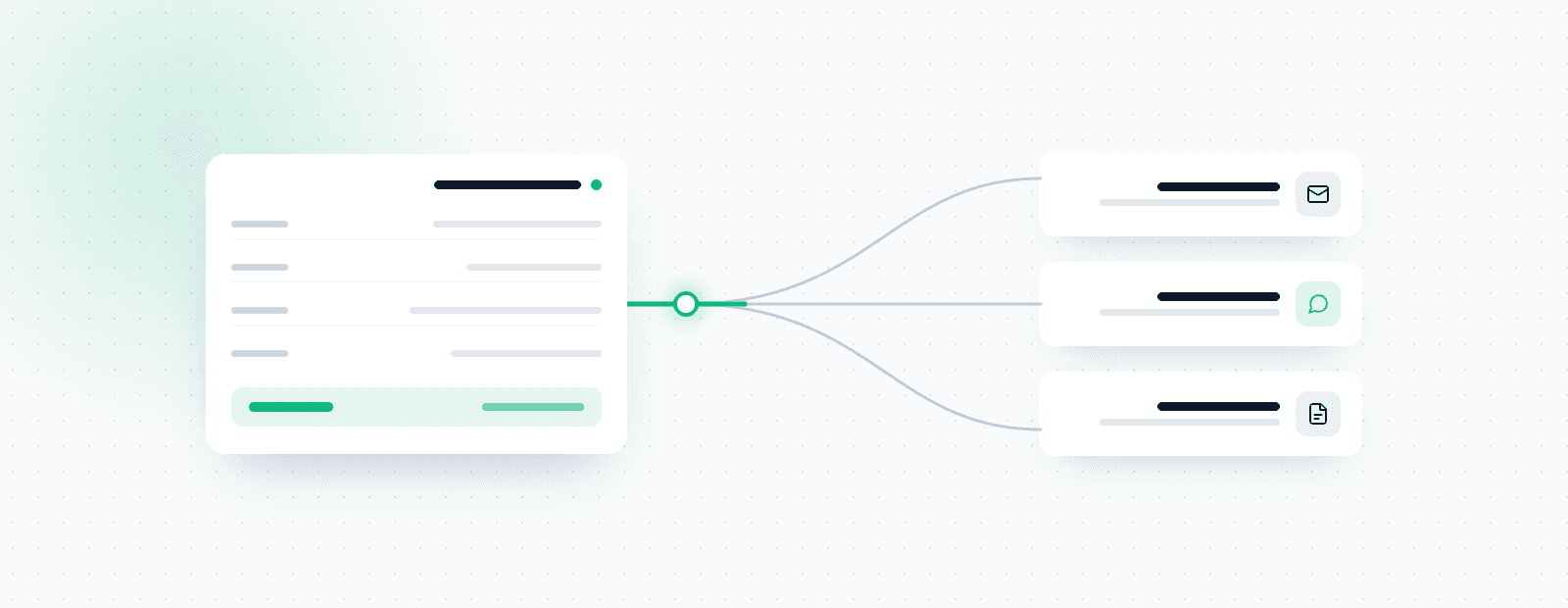
The diagram is the whole principle. The three places invoices actually arrive feed one collection point and leave it as a single report. Any source you have not connected is a branch left outside the picture, and the expenses on it will not be reported.
Who needs it, and who is fine on a spreadsheet?
A spreadsheet still makes sense for a business with very few documents a month, one or two expense sources, and a short list of deductions. If everything runs through a single company card and you pull one statement, dedicated software adds little.
The move pays off when at least one of these is true:
- Expenses arrive from more than two sources, for example email, messaging and paper receipts
- More than one inbox receives invoices
- You deduct business expenses, so every undocumented receipt is money left on the table
- Month end costs you more than an hour of hunting for documents
- More than one person spends money on behalf of the business
For scale: a Xero survey published in February 2026 of hundreds of US small business owners found they give up an average of 22 hours a month to financial management, which adds up to 33 working days a year. That figure is US and covers financial admin broadly rather than invoice collection alone, but it establishes the order of magnitude: hours, not minutes.
Worth saying plainly: the smaller the business, the larger the share of expenses that quietly disappears. A large company has a finance function that catches it. A sole proprietor does not. The gap between what was spent and what was reported tends to be wider at the small end, not narrower.
What does the missing paperwork actually cost?
This is the part almost nobody prices, and it is usually larger than the time.
Every business expense you cannot document is a deduction you cannot claim. Not a deduction you are barred from, one you simply have no evidence for, which amounts to the same thing at filing time. The IRS expects records that show the amount, the date, the place and the business purpose, and a card statement line saying "AMZN Mktp" satisfies none of those on its own.
That uncertainty is widespread. The 2026 Intuit QuickBooks Business Owner Report, an online survey of 1,305 US small business owners with 0 to 250 employees, found 23% fear underpaying and drawing IRS attention while 12% fear overpaying and tying up cash they need. The largest group, 34%, worry about both at once.
Read that as one finding rather than three. Two thirds of owners are anxious about the accuracy of a number they are required to certify, and the reason is almost never the tax code. It is that the paperwork behind the number is incomplete.
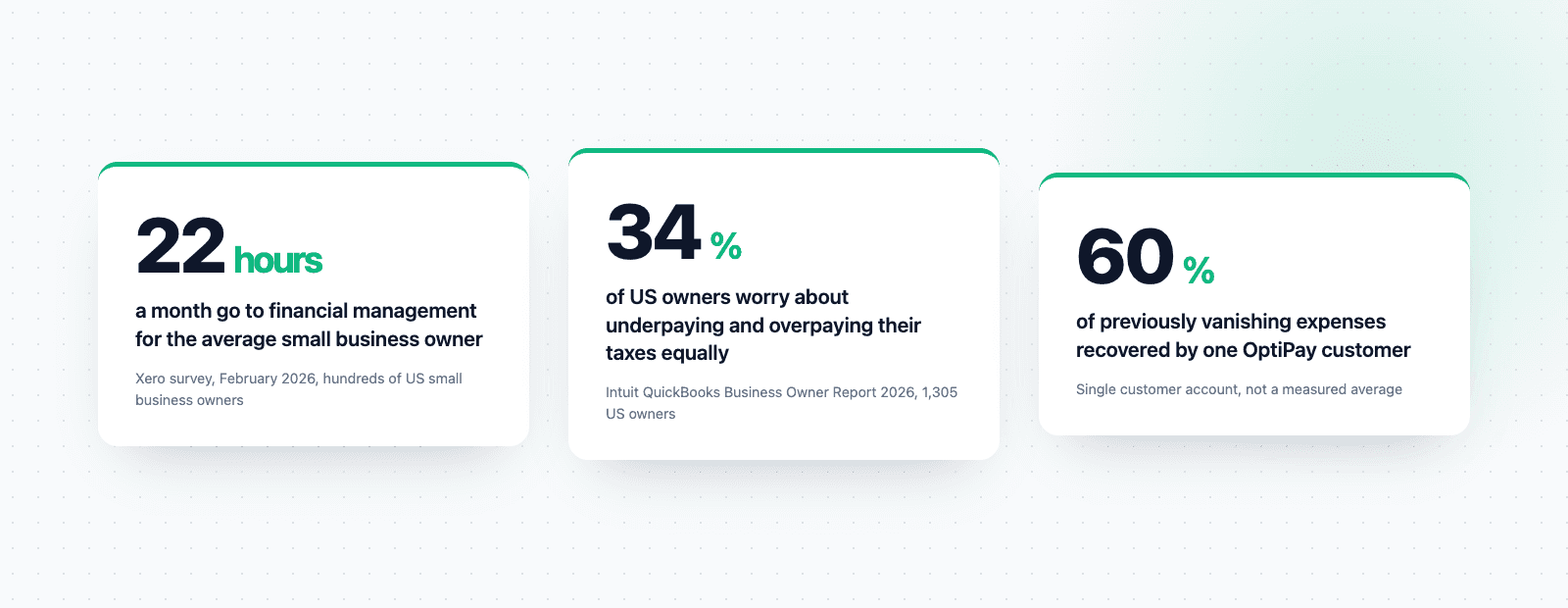
Three numbers, one problem seen from three angles. 22 hours a month is what the average small business owner spends on financial management, per Xero in February 2026. 34% of owners worry about underpaying and overpaying in equal measure, per Intuit QuickBooks in its 2026 report. And 60% is what one OptiPay customer recovered after switching. The first is the time, the second is the doubt, and the third is what happens when the documentation stops being the weak link. The two external figures come from separate surveys, so treat them as scale rather than as a forecast for your business.
What it looks like when it works
One of our customers, who runs a small services business, described his setup like this:
"Since I started using OptiPay I have recovered 60% of expenses that used to just disappear between the files and the paperwork. Now I photograph every manual expense the moment it happens, straight into OptiPay's WhatsApp bot. I have five mailboxes connected that get scanned continuously, and my monthly report goes to my accountant automatically, once a month."
That sentence is worth unpacking, because it describes three separate things that only produce the result together.
First, capture at the moment of spend. The manual expense, the one with no digital invoice behind it, is caught as it happens rather than in the evening. That is the hardest gap to close any other way, because every other method depends on memory.
Second, five mailboxes. Not one. Businesses accumulate inboxes over the years: a personal address, a company address, an old one suppliers still use. Software connected to a single mailbox will systematically miss whatever arrives at the others.
Third, the report sends itself. Not "you can export a report", but it leaves on its own at month end. That is the difference between a tool that needs you to remember it exists and a process that runs during a busy month too.
The 60% is one customer rather than a measured average, but it points at the right shape: the money is not sitting in the large expenses everyone remembers. It is in the small ones nobody tracks.
How is it different from accounting software?
Three categories get confused with each other, and each has a different job:
| Category | What it does | Right for |
|---|---|---|
| Spreadsheet or budgeting app | Manual entry, charts, budget tracking | Households, a business just starting out |
| Expense management software | Collects documents, extracts data, categorizes and reports | An active business claiming deductions |
| Accounting software | Full ledger, issuing documents, filing to the authorities | An accountant or bookkeeper |
The common mix-up is between the second and third. Expense management software does not replace your accountant and does not file on your behalf. It hands them clean, complete material, which is what makes their work cheaper and more accurate.
The second mix-up is between the first and second. A budgeting app will show you beautifully where the money went, but only after you entered it. If you are shopping because you are tired of entering it, a budgeting app does not solve your problem.
How to choose expense management software
Five questions that separate a system you will still be using next year from another forgotten subscription:
- Which sources does it genuinely collect from? Email alone is not enough. Invoices now arrive over messaging apps, as download links, and as photos. A source it does not support is an expense that will not be reported.
- How many mailboxes can you connect? If the answer is one, count how many you actually have before deciding.
- What happens when the extraction is wrong? No scanning engine is perfect. The real question is how many clicks it takes to fix a field, and whether the system learns from that correction for the next invoice from the same supplier.
- What does the accountant's export look like? Ask to see the actual file, not a screenshot of a dashboard. That document is the thing that travels onward.
- What happens to your history? Does it scan what is already sitting in the inbox, or start from today? The first gives you value immediately. The second means waiting a month to see anything.
How much should you expect to pay?
Prices run from free tiers with hard limits up to hundreds per month. The spread comes down to two things: how many sources the system collects from, and how much of the process is genuinely automatic rather than manual with a nicer interface.
The practical calculation is simple. Take the hours you spend each month collecting and sorting, multiply by what an hour of your time is worth, and add the deductions you forfeited because a document was missing. If that total is higher than the subscription, the decision has already been made. For most businesses still doing this by hand, the second component is the larger one, and it is also the one almost nobody works out.
Where to start
If you are considering a move, the cheapest possible start is to connect one mailbox and let the system scan backwards. Within minutes you will see how many invoices were sitting there and never made it into the books, which is the most honest answer to whether you need this at all.
For the mechanics of the collection step, our guide to invoice scanning and automatic collection goes deeper. If you are already comparing vendors, seven things to check before you pay works through the criteria. And if you would rather fix the process before the tool, business expense management starts there.
Frequently asked questions
What is expense management software?
A system that collects your business expense documents from the places they actually arrive, pulls the supplier, amount, date and business purpose out of each one, and turns them into a single report your accountant can use. Unlike a spreadsheet, the record is created the moment the document lands rather than when you remember.
How does expense management software work?
You connect the sources once, usually your inboxes and a messaging channel. The software watches for documents, reads them, extracts the fields, assigns a category and files the original alongside the record. You review exceptions rather than typing entries.
Do small businesses really need expense management software?
Not always. If expenses arrive from one source and you rarely deduct anything beyond the obvious, a spreadsheet still works. The case changes once documents come from several places, because the bottleneck stops being data entry and becomes collection, and a spreadsheet does not help with collection.
How much does expense management software cost?
Anywhere from free tiers with sharp limits to hundreds per month. The number that matters is not the subscription but the hours it removes plus the deductions you currently forfeit because a document went missing. Price the second one first, since most businesses never calculate it.
What should I check before choosing expense management software?
Which sources it genuinely collects from, how many inboxes you can connect, how quickly you can correct a misread field, what the export to your accountant actually looks like, and whether it scans your history or only starts from today.