Making Tax Digital for Income Tax has been mandatory since 6 April 2026 for sole traders and landlords with qualifying income over £50,000. Almost all of the coverage has been about the filing: four updates a year instead of one return. The filing is the easy part. It takes minutes, and the software does it.
What actually breaks is the record underneath the filing. A quarterly update is a set of category totals, and a total is only as good as the expenses that made it in. The expense you never captured does not become digital by being typed in later. It is simply absent, and now it is absent four times a year instead of once.
The scale of the gap is already visible. HMRC said in July 2026 that more than 864,000 sole traders and landlords were within scope. On 12 August 2026 it reported that more than 436,000 had successfully sent a first quarterly update, out of over 570,000 who had signed up to the service. Signing up is a form. Filing means having the numbers.
What does Making Tax Digital actually require?
Three things, and only the first two are new.
You keep digital records of your business income and expenses in compatible software. You send HMRC a quarterly update. You still submit an annual return at the end of the year, where the adjustments, reliefs and any other taxable income are dealt with.
The HMRC guidance is specific about who is in:
"You need to use Making Tax Digital for Income Tax from 6 April 2026 if your total annual income from self-employment and property is over £50,000."
Qualifying income is measured before expenses, based on the return you filed for the previous year. The threshold falls to £30,000 from April 2027 and to £20,000 from April 2028, so a much larger group is walking towards this over the next two years.
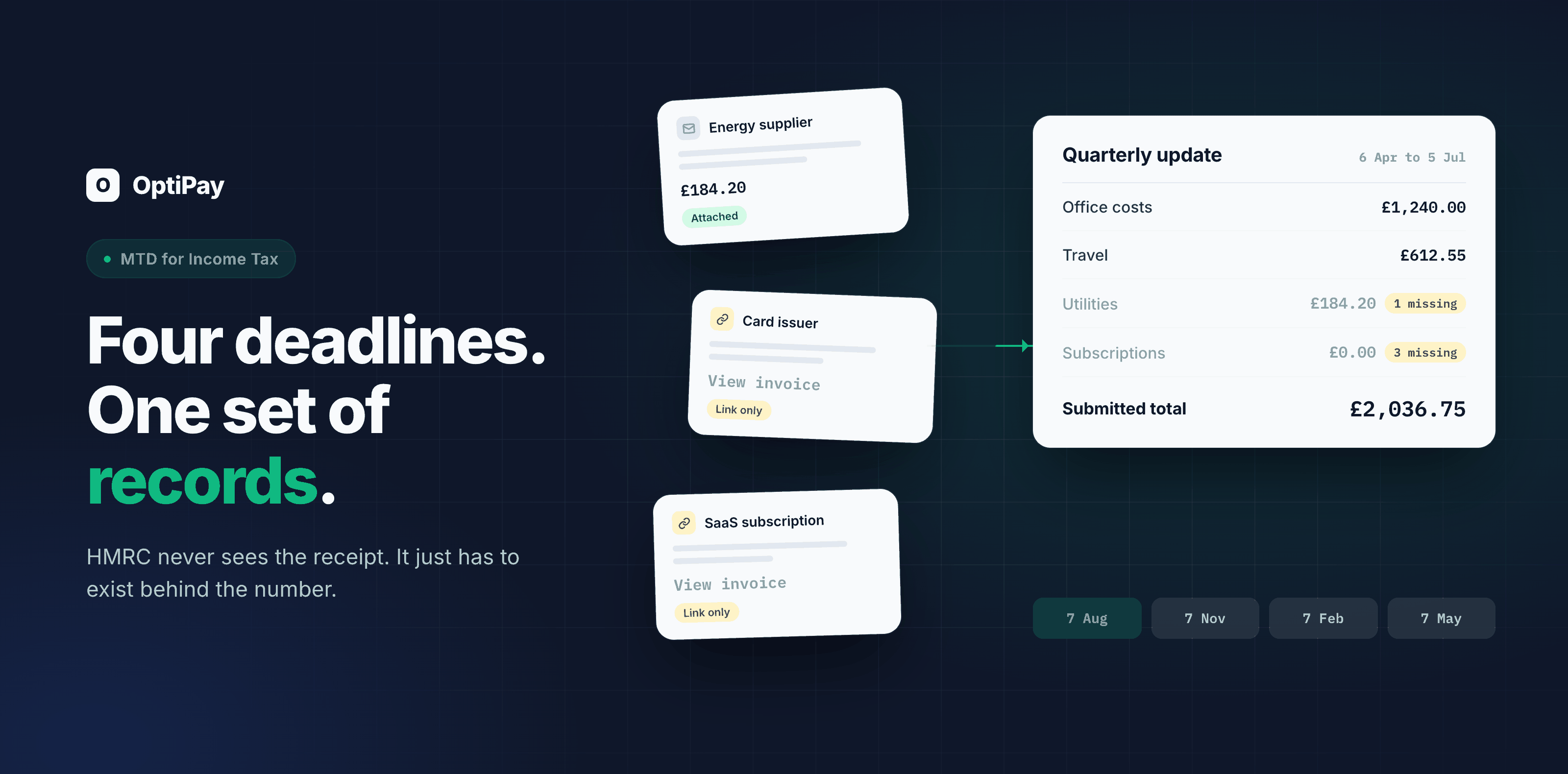
The deadlines for standard update periods are 7 August, 7 November, 7 February and 7 May. Two details in that schedule catch people out. Each update is cumulative, covering from the start of the tax year to the end of that period rather than the quarter alone. And a period with nothing in it still needs an update.
What HMRC does not ask you to send
This is the part most articles skip, and it is the part that determines what you actually need to have ready.
A quarterly update contains totals for each income and expense category you have used. HMRC's guidance on sending quarterly updates puts it plainly:
"HMRC will not receive details of individual digital records, such as a receipt or invoice."
So nobody is checking your invoices at the moment you file. That sounds like relief and it is the opposite. It means the submission will go through cleanly whether or not the number is right. Nothing at the point of filing tells you an expense is missing. You find out later, if you are ever asked to support the figure, or when the annual return does not reconcile with reality.
Why does quarterly filing expose gaps that annual filing hid?
Because of how long you have to fix something.
Under an annual return, an invoice you could not find in March was still findable in December. You had months of slack, and most people used it, chasing suppliers in one miserable week before the deadline. Under quarterly updates that slack is gone. A document missing from the April to July period surfaces at the start of August, if it surfaces at all.
The compensation is that the same shortening works in your favour, but only if the gap is visible. Discovering in August that an expense from May was never collected is a small problem. Discovering it fourteen months later, when the supplier's system has rolled over and the link in the email has expired, is a different problem.
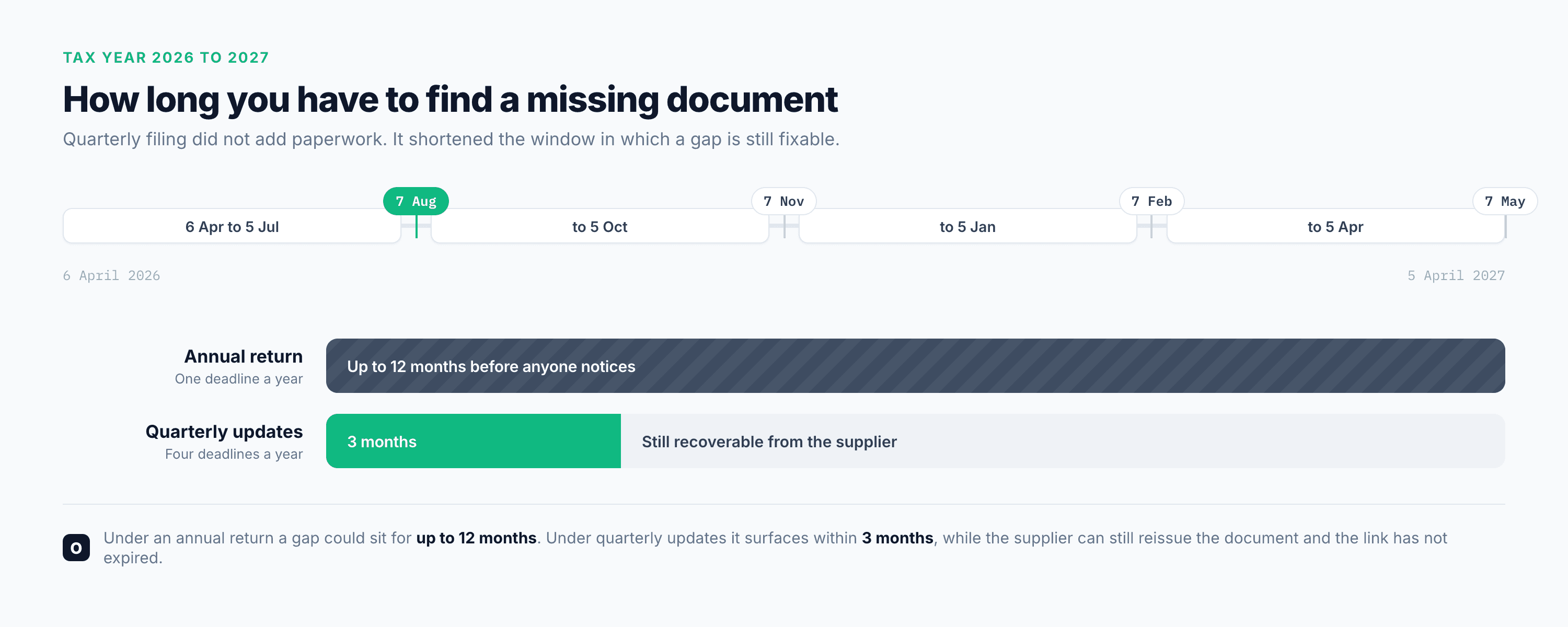
The diagram is the whole argument in one line. Under an annual return a gap could sit undetected for up to 12 months, by which point reissuing the document is a favour you have to ask for. Under quarterly updates the same gap surfaces within 3 months, while the supplier can still produce it and the link in the original email has probably not expired. The obligation got heavier and the recovery window got better at the same time.
| Annual return | Quarterly updates | |
|---|---|---|
| Time to notice a missing document | Up to 12 months | Up to 3 months |
| Chance the supplier can still reissue it | Falls sharply with age | Usually still high |
| Points in the year the records must be right | 1 | 4, plus the return |
| What a gap costs if it is never found | An understated year | An understated quarter, repeated |
Which expenses are most likely to be missing?
Not the big ones. Nobody loses a £4,000 invoice. What goes missing is the steady, unremarkable, recurring charge, and one category of it goes missing far more reliably than the rest: the invoice that never arrived as an attachment.
A great many suppliers no longer attach the document. They send an email saying your invoice is ready, with a link to their billing portal. The document is real and readable, and it stays on their server. Anything scanning your inbox for attached files finds nothing, and treats the message as irrelevant.
| Category | Typical senders | How it arrives |
|---|---|---|
| Energy, mobile and broadband | Utility and telecoms suppliers | A billing notice linking to your account portal |
| Cards and payments | Card issuers, banks, payment processors | A charge alert linking to the statement or receipt |
| SaaS and subscriptions | Cloud storage, accounting tools, design and project software | An automatic monthly charge with a link to the invoice |
| Small suppliers and subcontractors | Trades, studios, consultants, freelancers | Issued through invoicing software that sends a view link |
Look at what the first and third rows have in common. These are recurring charges. So an expense of this kind does not go missing once. It goes missing every month, from the same supplier, for the same amount, and it is invisible in exactly the same way each time. Four quarterly updates, each understated by the same amount, is a pattern rather than an accident.
We wrote about this failure mode on its own in why invoices sent as links go missing. It matters more under MTD than it did before, because the window to catch it is now three months wide.
What does "digital record" actually mean here?
It means the transaction is recorded digitally: what it was, when, how much, and which category it belongs to. That is what the quarterly total is built from.
What it does not mean is that typing an expense in from memory makes it a record. It makes it an entry. If the underlying document is gone, the entry is a figure you cannot support, and the whole point of the digital record is that it can be supported.
This is why the collection step matters more than the filing step. Capture the document when it arrives and the digital record writes itself and stays defensible. Reconstruct at the deadline and you are building totals out of what you happened to remember.
For anyone still handling this in a spreadsheet, that is the honest test of whether the spreadsheet is still working: not whether the sums are right, but whether every row has a document behind it that you could produce tomorrow. We went through that question in detail in expense management software for small business.
Where OptiPay fits, and where it does not
Being exact about this, because MTD is an area where vague claims cause real damage.
OptiPay is not on HMRC's compatible software list and does not send quarterly updates to HMRC. You file through MTD compatible software, and you should check the current HMRC list when choosing it. OptiPay does not replace that step and does not try to.
What it does is the step before. It connects to your mailboxes and collects the invoices and receipts as they arrive, including the ones that arrive as a link rather than a file, by opening the link and pulling the document itself. It reads the supplier, the date, the amount and the tax off the document, categorises it, and stores the original attached to the record, so an expired supplier link months later costs you nothing. Anything on paper, or a link that came by text rather than email, goes in through the WhatsApp AI assistant at the moment it happens.
The result is that when a quarterly deadline arrives, the figures are already assembled and each one has a document behind it. One customer put the effect in their own terms: since switching, they recovered around 60% of the expenses that used to disappear between files and paperwork, running five connected mailboxes with a report going out automatically every month.
A setup that survives quarterly deadlines
Four steps, in this order, because each one makes the next cheaper.
- Connect the mailboxes the invoices actually reach. Usually more than one, and the forgotten one is where the subscriptions live.
- Scan backwards first. Before worrying about the next quarter, find out what the last one missed. This is the number that settles whether you have a problem, and it is usually the recurring charges rather than the large ones.
- Fix the paper and the messages at source. Photograph anything on paper the moment you receive it, and forward links that arrive by text, instead of collecting them into a pile for later.
- Reconcile once per quarter, not once per year, and feed the finished figures into your MTD software. Reconciling something that is already complete takes minutes.
If the reconciliation itself is what you dread, expense reports for your accountant covers what to hand over and in what shape.
What to do before the next deadline
The next standard quarterly deadline is 7 November. That is enough time to find out where you stand, and the test takes about a minute.
Open the last email from your energy supplier or your card issuer, and check whether that expense appears in your records. If it does not, you have found the class, not a one-off. It will be missing from the previous quarter too, and from the one before that.
Want to see what is already sitting in your inbox uncollected? Start with OptiPay, connect one mailbox and let it scan backwards. There are 30 days free with no credit card, and you can look at plans and pricing first. OptiPay is built by Optimally, which specialises in automation and AI for businesses.
Frequently asked questions
Do I have to send my receipts to HMRC under Making Tax Digital?
No. A quarterly update contains totals for each income and expense category, and HMRC guidance states it will not receive details of individual digital records such as a receipt or invoice. The receipts still have to exist as records behind those totals, and you still have to be able to produce them if HMRC asks. What changed is that you now assert those totals four times a year instead of once.
When are the Making Tax Digital quarterly updates due?
For standard update periods aligned to the tax year, the deadlines are 7 August, 7 November, 7 February and 7 May. Each update is cumulative, covering from the start of the tax year to the end of that update period, and you must send one even if you had no income or expenses in the period.
Will I be fined if I miss a quarterly update in the first year?
HMRC has said it will not apply penalty points for late quarterly updates during the 2026 to 2027 tax year. Penalty points still apply to a late tax return in that year, and to late payment. From 2027 to 2028 onwards each missed deadline earns a point, and four points within the threshold period triggers a £200 penalty.
Who has to use Making Tax Digital for Income Tax, and from when?
Sole traders and landlords with total annual income from self-employment and property over £50,000 have had to use it since 6 April 2026. Qualifying income is measured before expenses, based on the previous year of return. The threshold drops to £30,000 from April 2027 and to £20,000 from April 2028.
Is OptiPay MTD compatible software?
No, and it does not try to be. OptiPay does not send quarterly updates to HMRC, so you still file through software on the HMRC compatible software list. OptiPay sits before that step, collecting the invoices and receipts out of your email and messages so the figures you file are complete and every one of them has a stored document behind it.